


Stay Informed with PulseIQ Notifications

PulseIQ Notifications help production teams identify issues sooner, reduce downtime, and stay informed without constantly monitoring PulseIQ.
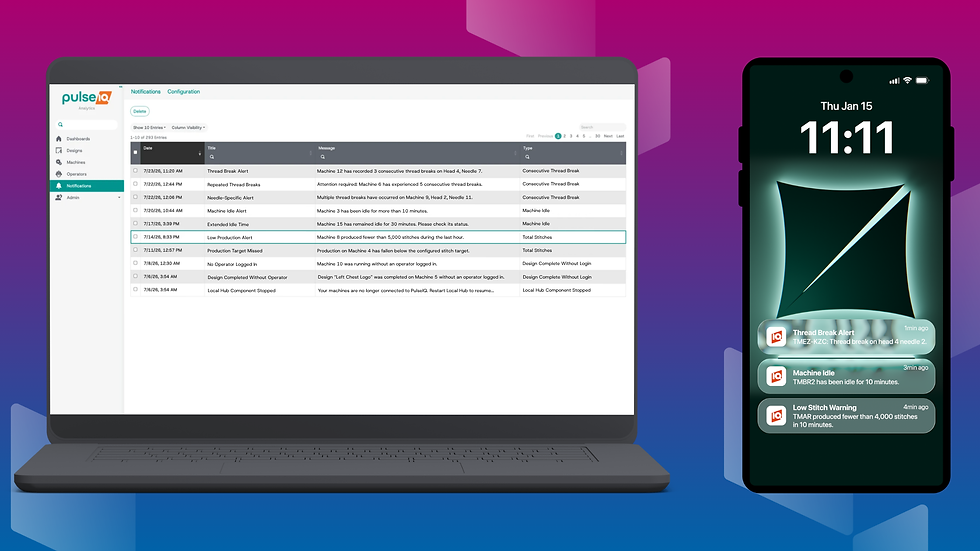
For smaller shops, notifications provide the flexibility to step away while a machine is running and receive an alert if something requires attention. When paired with the reliability of Tajima equipment, this can help operators focus on other work without losing visibility into production.
In larger production environments, managers can stay synchronized with activity across the floor. They can receive alerts about thread breaks, idle machines, or other issues as they happen, often before an operator has time to report them directly.
With PulseIQ Notifications, your team can receive alerts when:
A machine remains idle for too long
Multiple consecutive thread breaks occur
Production falls below a set stitch target
A subscription is approaching its end date

How PulseIQ Notifications Work
Notifications are created using customizable triggers. You choose the event to monitor, set the conditions that activate the alert, and decide which machines should be included.
You can also customize the notification title and message using macros that automatically add relevant production details. For example, a thread break notification can identify the specific machine, head, and needle where the break occurred, along with the number of consecutive breaks. Other macros can display information such as idle time, monitoring intervals, and production totals.
Notifications can be delivered by email, push notification, or webhook. Push notifications require the PulseIQ mobile application, which is available on the Apple and Google Play stores for an additional charge.
Notifications are included with PulseIQ Analytics.
Contact us to get started with PulseIQ today.


Comments