


Introducing Tajima DG17.5

With Tajima DG17.5, you’ll spend less time on prep work and fixing issues after a test sew-out. That means more time doing what you love: designing and creating. Here are the four changes that make the biggest difference.

Customer artwork that's ready to digitize
DG17.5 now imports any PDF-compatible Adobe Illustrator (.AI) file directly into the workspace. If you work from vector artwork, there's no more chasing customers for a re-export or converting files to a supported version first: you open the file and start digitizing right away.

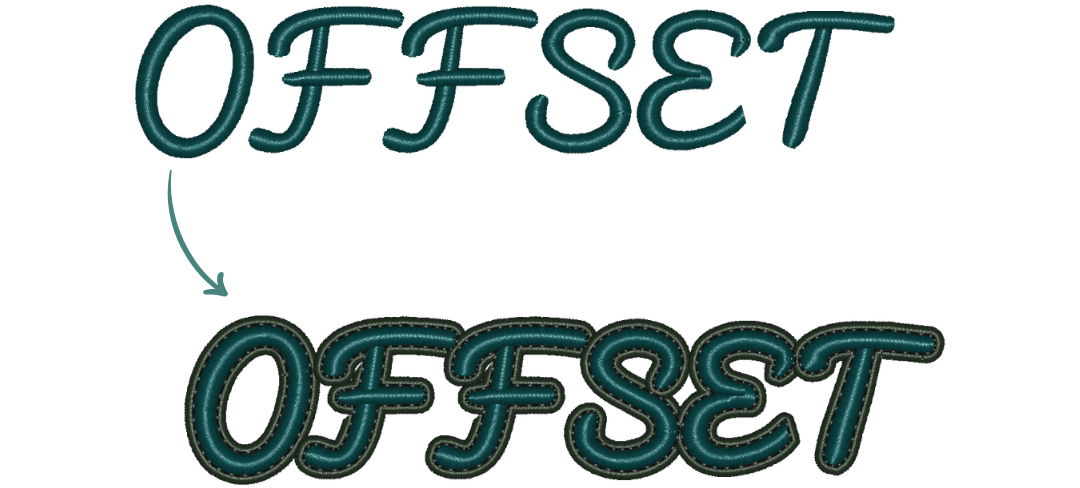
Offsets in one step, not three
The offset tool can now create segments directly as Artwork, Run, Steil, Cross-stitch, or the original type, and it handles embroidery fonts more cleanly.
Cleaner sew-outs with fewer test runs
DG17.5 eliminates short stitches on mitered Steil corners, smooths the curves in Enhanced Column segments, and makes Create Boundary trace complex designs more accurately. Every digitizer benefits, especially on satin borders and detailed work: fewer thread breaks, fewer test runs, and less time fixing after the fact.

Appliqué lettering, your way
Until now, appliqué text sewed in one fixed order. DG17.5 lets you choose by stitch type (the default), which keeps machine stops to a minimum when every letter uses the same fabric, or letter by letter. Sewing letter by letter is ideal when using different fabric for each letter or have overlapping letters, since each one is placed, tacked down, and bordered before the next begins.

Honorable mentions
Beyond the big four, DG17.5 is packed with other improvements that make everyday digitizing smoother. A few favorites:
Bigger USB drives: save designs to USB sticks up to 60 GB, up from 4 GB.
Shift-key alignment: hold Shift while dragging to keep segments perfectly horizontal, vertical, or at 45°.
Presets on right-click: apply a preset to any segment in two clicks.
Pacifico font: the popular retro brush script, now available as an optional embroidery font.
A faster, cleaner workspace: better speed and stability, with key tools moved from the right-click menu onto the ribbon.
A Note on Reforming the Context (Right-click) Menu
As part of a continuing process of optimizing the design editing process, functions have been removed from the context menu. You will now find these tools and functions in their dedicated areas on the ribbon. If the ribbon is turned off, these tools will move back to the context menu.
Together, these updates mean less time fixing and more time creating.
Want every detail? Read the full DG17.5 release notes for the complete list of fixes and enhancements.
Get DG17.5 today
Current DG17 users can download and install DG17.5 now from our website.


Comments